Subscribe:

Ads 468x60px

Pages

Wednesday, September 11, 2013

The Flipped Classroom

Many teachers are starting to ask questions about blended instruction and the Flipped Classroom.  This, to me, really shows that technology is here to stay and not going anywhere.  Teachers are embracing a new level of differentiated instruction by posting notes, lectures and lessons online for their students to have learning occur outside the generic "4 walls".  I found this info-graphic about the Flipped Classroom from Cambridge Univeristy and Knewton.

Flipped Classroom
            Created by Knewton and Column Five Media

Sunday, July 29, 2012

My Teaching Philospohy

I've been teaching for 11 years now and still am amazed every year by how passionate students can be if you show them something to be passionate about.  I feel that the type of student has drastically changed over the last decade and growing up in today's society is nothing like we experieinced as kids. People say their brains are hardwired differently, so doesn't that mean that my teaching style must also change to meet these new brains?
This is where I feel one old school teaching idea still comes into play.  We use the student's strengths to help them achieve greatness.  By using technology in daily lessons, I am not only playing to their strengths, but they are also using tools that are available to them in the real world.  Technology isn't doing the thinking for them, mind you, it is helping them critically think around problems that didn't seem possible before.  Seeing the creative thinking process of a student using technology to further their knowledge is exciting to see, and I'm glad I can help facilitate technology in curriculum.  


 Just for fun, do you remember your first computer? Mine? A Commodore 64 (if you don't count the Intelivision).

3 things I have learned from this AQ course:

  • As always, sharing and discussing with other teachers is a valuable resource. I've been introduced to Web tools and ways of teaching I haven't thought of before
  • Trying something new. It's not easy to find the time to try new programs and this course made me create projects I may not have tried earlier
  • Take an outside look at my teaching styles and using technology effectively for all my students.
To become a better leader:
  • Have more regularly schedule PD in the school that reflects what teachers are doing in class
  • Create a showcase of programs and why you would use them in the classroom with handouts and tutorials so teachers can have easy access to learn them.
  • Create an organized resource bank of programs by curriculum and grade for teachers to use.

Monday, May 14, 2012

Stop Motion Winners

We have a winner!  Congratulations to all the students who submitted a stop motion video for our contest.  Each video was watched by the 5/6 class and together we choose the winner by secret ballot.  The winner of the contest is "Your Friends". This group created a claymation video for the kindergarten class to learn the value of friendship.


Wednesday, October 19, 2011

Royalty Free multimedia

My apologies for not getting to the Virtual Classroom Blog. I promise to post more frequently now that I've settled into the new tech job.

I've been training a lot of teachers and students how to create their own multimedia presentations and there are are some programs that are definitely winning out by being easy to use.  Audacity seems to be a school favourite so I thought I would post several links to royalty free music and sound effects here that will take your voice recordings to the next level.
Here's a short clip of a students reading the synopsis of the Hunger Games. Note how the background adds to their presentation (can you say book report replacement?).       


Podcast Powered By Podbean
   

These are my go-to websites that I use for background effects that are safe to use (no viruses here!) and free to use.  Enjoy creating!


freeplaymusic.com


 incompetech.com


pacdv.com


soungle.com

Wednesday, September 28, 2011

QR codes in the classroom


Recognize this little black box? Did you already whip out your mobile device and scan it? For those of you who have seen these little black boxes on virtually everything now, but are unsure of what they do, they are called "QR codes" (quick response codes). They are linked to websites, documents or pictures that the person, who made the code, wanted to have access to. They are great for instant advertisement, but can these be used in education.
The answer is yes! Over the last few months I've seen a roll out for iPads and mobile devices in the classroom, especially in the younger grades where manipulation of a tablet is a plus. By scanning these codes, students can have quick access to a websites, text documents,

I think this would also be a great ice-breaker for educators at a meeting. They can type in some quick information about themselves into a QR generator, print out the box and learn a little about their fellow teachers.

Here's a fantastic example to see
http://www.readwriteweb.com/archives/wikipedia_unveils_probably_the_coolest_qr_thingy_e.php


From the internet: http://qrcode.kaywa.com/
For the iPad/Ipod: http://itunes.apple.com/us/app/qr-reader-for-iphone/id368494609?mt=8

Monday, September 19, 2011

Twitter Made me a Better Teacher


Imagine that your fellow teacher tells you that they have a resource that can help you 24/7, is at the touch of your fingertips, and will help you become a better teacher.  Would you use it?
Of course.
I am still new to the Twitter universe.  In fact, it was one of the things I avoided.  I didn't need to constantly know what celebrities were doing every minute of the day.
That was before I went to a conference in Toronto where I learned about building my Personal Learning Network.  After creating a free account, I started "following" other educators in the room.  Then I found a network of teachers that dealt specifically with my interests (technology in education). After connecting with a few key educators, I gained a huge wealth of knowledge (Did you see my Choose Your Own Adventure blog post??-Twitter find).
There are tons of tutorials to help you learn how to use twitter.  The sooner you network yourself, the more valuable you will find this tool for education (yes I said tool).
Here's a few people to start following to get you started.
A great chat that is always ongoing is #edchat .

    Monday, September 12, 2011

    Back Channel chatting

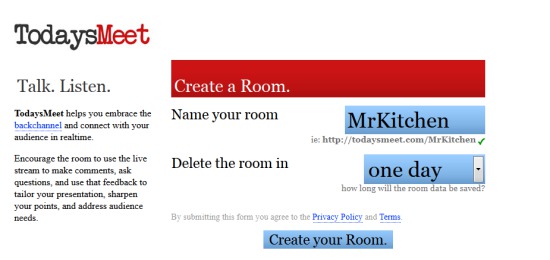
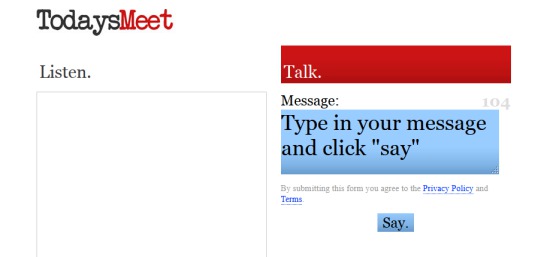
    A great tool where students can share ideas and collaborate is TodaysMeet.com.  I first used this tool at a technology conference in Toronto.  While the presenter spoke, many people were commenting or elaborating on was was being said.
    Think of the real-time collaboration your class can have with this Web 2.0 tool.  Some quick examples:
    • While watching presentations, videos, lectures, etc, students can discuss terms being taught and collaboratively share notes
    • Collaborate with another school, invite professionals or while working on projects.
    • You will have an instant transcript of your student's thinking and of those "light bulb" moments.
    It is very simple to use and doesn't need any email adressess or registration.  You can follow the pictures below to create your TodaysMeet......Today!

    Step 1

    Step 2

    Step 3

    Step 4

    Friday, September 9, 2011

    Digital Choose Your Own Adventure stories.

    Remember those little white books from the 80's that allowed you choose whether your hero slayed the dragon or ran in fear?  I loved reading "Choose Your Own Adventure" novels when I was young and yes, I cheated.  Like every other kid, I hated dying 20 times before I got the correct solution.

    When I introduced this style of writing to my Grade 6 students, I was blown away by the intricate pathways they created (so much that we had to create digital maps to keep track of their choices).  Several of my reluctant writers created 30 page books, weaving tales ranging from WWII to alien invasions!

    So why am I telling you this in my virtual classroom? I was recently reminded by a Tweet from rmbyrne ( I recommend following his blog at http://www.freetech4teachers.com/) about using YouTube to create scenarios and story lines.  Enter...wait for it....Online "Choose Your Own Adventure" digital media!!!

    By using YouTube's annotation feature, you can link other videos to notes left in the video.  The viewer clicks on an option and is re-directed to your next linked video.

    As usual, I've used my virtual classroom contacts, a.k.a. my unknowing family, to recreate a book favourite of mine, James Dashner's "The Maze Runner".  Remember to think all the cross curricular possibilities of this YouTube feature (historical timelines, literacy, how-to vids, etc..).

    When playing the first video, you will see the choices pop up somewhere on the screen at the end of the scene.  Unfortunately the annotations won't pop up in some mobile devices that can't use flash (iPhone, iPad, etc).  If you don't see the annotations pop up, try viewing the video through a laptop or desktpop computer. It's also best viewed from YouTube rather than through the blog. You can get there through http://youtu.be/bgOKFE9Z0xs.  There are several choices through the entire string of videos. Enjoy.

    Tuesday, September 6, 2011

    Audacity

    This is one of my old tutorials on Audacity.  For those of you using Audacity from home, ignore the desktop as it pertains to my school board. I like to use Podbean as my podcast platform when I have finished editing.  You can download Audacity free at http://audacity.sourceforge.net/.


    Audacity Tutorial from Mr. Kitchen on Vimeo.

    Sunday, August 21, 2011

    Voicethread

    A great little Web 2.0 tool is called VoiceThread (www.voicethread.com)

    VoiceThread allows you and your students to leave text, audio, and video comments on what you post.   You are able to post all types of multimedia and can even have multiple posts/slides on one thread.  It's extremely simple to use and by creating multiple "guests" on one account, teachers don't have to worry about student emails or passwords.  Check out my sample VoiceThread below!

    Wednesday, April 13, 2011

    Internet Safety

    It's fairly obvious that we live in a technologically-minded society. The problem is, our kids know more than we do! They are digital natives who are growing up with cell phones, iPods, netbooks, etc.  If you're reading this, then you already know we use technology as a valuable resource tool in my classroom. Programs like Glogster, Audacity, Premier Tools and the SMARTboard help our children learn curriculum in a way they understand.

    One problem that should concern us is the improper use of social media. Too many children have Facebook accounts, use MSN and of course text each other constantly. I'm not here to say, "STOP!", but I will say we need to be more knowledgeable of what our children are doing online. Cyber-bullying is now becoming the #1 form of bullying in today's society. Children are posting and writing personal information online, not realizing the digital footprint they are leaving...forever...for anyone to see...anywhere in the world!

    I hope you have signed up for the Internet safety session at the Open House, here at Victoria. If you can't make it, I will be posting some of the information on our blog so you can be aware of certain precautions your children can take to stay safe.

    In the mean time, check out the website link under "helpful websites" to learn how to make sure you're safe on the web ( ex: Facebook account is secure.  F.Y.I. under the disclaimer for Facebook, you must be 13 years of age to be on Facebook!)

    Sunday, March 27, 2011

    Glogster

    I thought giving a little preview of my Glog will help inspire you to use this new Web 2.0 tool during the Daily 5. Can you say "Book Report"?

    Sunday, March 20, 2011

    Earth Hour 2011

    Earth Hour will be on Saturday March 26 at 8:30 p.m.  I would like us all to try an participate during this event and shut off the lights, t.v.s and especially those computers (yes, I'm telling you this!).  On Friday, we will be having our own earth hour by shutting off all the lights and computers and we'll be talking about this event throughout the week.  For more information, go to http://www.earthhour.org/.

    Thursday, February 3, 2011

    Phonetic Punctuation


    Podcast Powered By Podbean

    To help us learn how punctuation affects our fluency when reading I have dig up a great old clip from a comedian named Victor Borge.  Part of his act is something called Phonetic Punctuation.  For every punctuation mark, he has assigned a sound effect. We're going to try this in class.  I hope some brave souls let me record some of these for the podcast.  The sounds that our class have chosen are in the above sound clip.  Have fun!!

    Wednesday, December 15, 2010

    Human Body Research Project

    Here is a copy of the guidelines if you are working on a disease or disorder. Remember that you have to state your resources (books, websites, etc), there must be research involved (if you have a relative who suffers from a disease, like cancer, they can help you will examples from their experiences but may no know all the treatments, discoveries, etc), and all projects have a written component (you can't just show videos or pictures on the SMARTboard).

    Diseases & Disorders of the
     Human Body

    1. Choose a disease or disorder that affects a system, organ, part or structure of the body.

    2. Use the guidelines below to help you research information about your disease/disorder. Remember that these are suggestions, include any information that you think is important.

    Guidelines: 
                  Who discovered your disease?
                  How did it get its name?
                  What type of people does it affect (race, gender, age)
                  What system of the body does it affect?
                  Causes or risk factors.
                  Describe the symptoms.
                  What does the disease do to the body?
                  Can it be prevented?
                  Is it treatable/curable?
                  Why did you choose to research this?
                  What are your reactions to your research?


    Presentation Methods:

                SMARTboard presentation
               
                Newscast/ Video

                Model/Diorama

                Comic book / Storyboard


    Examples of diseases/disorders

                Diabetes               Stroke

                Asthma                  Downs Syndrome

                Lou Gehrig’s Disease

                Epilepsy               

    Thursday, December 9, 2010

    Folktale

    Here is our outline of writing your First Nations folktale. Remember to stay true to the format and remember your target audience.

    A folk tale is a traditional story that has been passed down orally from generation to generation. Traditional First Nation folktales often are told to explain a natural event, an animal characteristic, a belief, a theme or a message.
    When writing your folktale you need to included all the elements of narrative writing:
    Characters: -can include North American animals, spirits, tribes

    -have many traits such as being greedy, sneaky, helpful, etc.

    -include dialogue
    Setting: - North American setting

    Plot: -should contain three conflicts or problems for your characters to solve, can be a quest to solve, characters trying to trick each other...etc
    Lesson/Creation: -what will your folktale explain to you readers?

    To Do

    1. Outline your story on your story map.

    2. Fill out the character map to better understand your main character.

    3. Write your narrative. Should be approximately 3 pages, single spaced

    4. Conference with Mr. Kitchen often

    Editing and Revising checklist

     Did you begin your story with “Long ago” or a similar phrase?

     Does your story teach a lesson or tell how something came to be?

     Is the lesson/creation clear?

     Is your setting described briefly?

     Have you described your characters through their appearance, actions and speech?

     Have you used dialogue?

     Was the conflict/plot solved?

     Did you use proper paragraphs and varied sentences?

    Friday, December 3, 2010

    Patterning and Algebra

    I know this has been on the minds of many of my parents.  "What in the world is my child learning in math?  I haven't seen homework from them in weeks!"
    Don't worry, we still work on math in school but math has changed from when you and I went to school.  Instead of "drill and kill" or "around the world", which really only meant memorizing your basic facts, we are now understanding and explaining how math works and is inter-related.  In the past two weeks we have been part of a brand new focus group that is working on increasing the student's understanding of multiplying through algebra and patterning.  It is truly amazing to see what they are doing and they will soon be coming home with some demonstrations for you.  In the meantime, here are some patterns that they are finding rules to.  Have them tell you what the composite rule is and how they know it is correct.


    Tuesday, November 16, 2010

    Report Cards and Interviews

    By now, you've had a chance to see and read the new progress report card.  You'll notice a bigger emphasis on learning skills and behaviour than marks.  As I've always told the students, "Your learning skills usually dictate the types of marks you'll see."
    Just a reminder that interviews are on Thursday November 18th from 4pm-7:30 and Friday November 19th from 12:15pm-3:00.  I've tried to accommodate most requests and I will be sending home the times of your interview on Wednesday.  Don't forget that regardless of the option you choose, I will be making sure I've had a chance to talk to all parents either face-to-face or by phone. 

    Friday, October 22, 2010

    The Daily 5

    Here's a speedy version of what the Daily 5 looks like in my classroom!

    Sunday, October 17, 2010

    Mom and Dad, Please Read me a Story

    I know how that title sounds but this is going to be good.  The students and I have decided that since they are such pros during "The Daily Five", they are going to share what they have learned with you.  This upcoming weekend they are going to be bringing home an assignment called "Read to Self".  This simply involves reading by yourself in a comfy spot without distractions.  26 of us do this everyday in school for 1/2 hour!!

    But what about the grocery shopping, hockey, clubs, yard-work, dinner???  We had a great discussion about this and thought in the entire weekend, couldn't we all just fall into a book for only 1/2 hour sometime between Friday and Sunday night.  Who says the enjoyment of reading has to stop at the end of school. (now I remember the types of books they had "back in our day", but writers are so much more entertaining now).

    Here's how we are going to help.  First ask your child what a "Good-fit Book" is.  I'm a firm believer in abusing my library for free books and you are more than welcome to borrow from my collection at school.  Next, have your child tell you how to "Read to Self" from their anchor books.  After that, you need to find a comfy spot, have everything you need within an arms-length (coffee in my case), and let go of everything else to begin reading!  Your son or daughter is an excellent role model; you can look at them to help you because hopefully they're laying on the floor, feet up on the couch next to you, reading.  Enjoy!!