Subscribe:

Ads 468x60px

Pages

Monday, September 12, 2011

Back Channel chatting

A great tool where students can share ideas and collaborate is TodaysMeet.com.  I first used this tool at a technology conference in Toronto.  While the presenter spoke, many people were commenting or elaborating on was was being said.
Think of the real-time collaboration your class can have with this Web 2.0 tool.  Some quick examples:
  • While watching presentations, videos, lectures, etc, students can discuss terms being taught and collaboratively share notes
  • Collaborate with another school, invite professionals or while working on projects.
  • You will have an instant transcript of your student's thinking and of those "light bulb" moments.
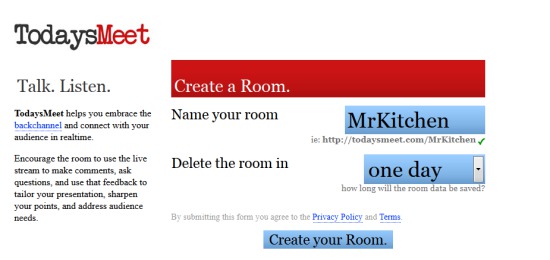
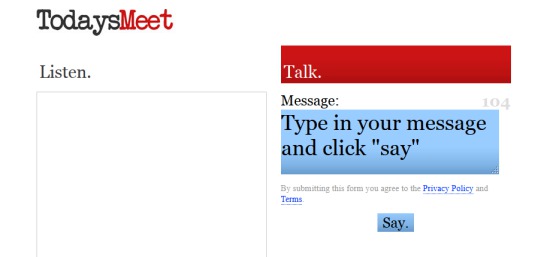
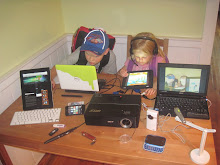
It is very simple to use and doesn't need any email adressess or registration.  You can follow the pictures below to create your TodaysMeet......Today!

Step 1

Step 2

Step 3

Step 4

Friday, September 9, 2011

Digital Choose Your Own Adventure stories.

Remember those little white books from the 80's that allowed you choose whether your hero slayed the dragon or ran in fear?  I loved reading "Choose Your Own Adventure" novels when I was young and yes, I cheated.  Like every other kid, I hated dying 20 times before I got the correct solution.

When I introduced this style of writing to my Grade 6 students, I was blown away by the intricate pathways they created (so much that we had to create digital maps to keep track of their choices).  Several of my reluctant writers created 30 page books, weaving tales ranging from WWII to alien invasions!

So why am I telling you this in my virtual classroom? I was recently reminded by a Tweet from rmbyrne ( I recommend following his blog at http://www.freetech4teachers.com/) about using YouTube to create scenarios and story lines.  Enter...wait for it....Online "Choose Your Own Adventure" digital media!!!

By using YouTube's annotation feature, you can link other videos to notes left in the video.  The viewer clicks on an option and is re-directed to your next linked video.

As usual, I've used my virtual classroom contacts, a.k.a. my unknowing family, to recreate a book favourite of mine, James Dashner's "The Maze Runner".  Remember to think all the cross curricular possibilities of this YouTube feature (historical timelines, literacy, how-to vids, etc..).

When playing the first video, you will see the choices pop up somewhere on the screen at the end of the scene.  Unfortunately the annotations won't pop up in some mobile devices that can't use flash (iPhone, iPad, etc).  If you don't see the annotations pop up, try viewing the video through a laptop or desktpop computer. It's also best viewed from YouTube rather than through the blog. You can get there through http://youtu.be/bgOKFE9Z0xs.  There are several choices through the entire string of videos. Enjoy.

Tuesday, September 6, 2011

Audacity

This is one of my old tutorials on Audacity.  For those of you using Audacity from home, ignore the desktop as it pertains to my school board. I like to use Podbean as my podcast platform when I have finished editing.  You can download Audacity free at http://audacity.sourceforge.net/.


Audacity Tutorial from Mr. Kitchen on Vimeo.

Sunday, August 21, 2011

Voicethread

A great little Web 2.0 tool is called VoiceThread (www.voicethread.com)

VoiceThread allows you and your students to leave text, audio, and video comments on what you post.   You are able to post all types of multimedia and can even have multiple posts/slides on one thread.  It's extremely simple to use and by creating multiple "guests" on one account, teachers don't have to worry about student emails or passwords.  Check out my sample VoiceThread below!

Wednesday, April 13, 2011

Internet Safety

It's fairly obvious that we live in a technologically-minded society. The problem is, our kids know more than we do! They are digital natives who are growing up with cell phones, iPods, netbooks, etc.  If you're reading this, then you already know we use technology as a valuable resource tool in my classroom. Programs like Glogster, Audacity, Premier Tools and the SMARTboard help our children learn curriculum in a way they understand.

One problem that should concern us is the improper use of social media. Too many children have Facebook accounts, use MSN and of course text each other constantly. I'm not here to say, "STOP!", but I will say we need to be more knowledgeable of what our children are doing online. Cyber-bullying is now becoming the #1 form of bullying in today's society. Children are posting and writing personal information online, not realizing the digital footprint they are leaving...forever...for anyone to see...anywhere in the world!

I hope you have signed up for the Internet safety session at the Open House, here at Victoria. If you can't make it, I will be posting some of the information on our blog so you can be aware of certain precautions your children can take to stay safe.

In the mean time, check out the website link under "helpful websites" to learn how to make sure you're safe on the web ( ex: Facebook account is secure.  F.Y.I. under the disclaimer for Facebook, you must be 13 years of age to be on Facebook!)