Monday, May 14, 2012
Stop Motion Winners
We have a winner! Congratulations to all the students who submitted a stop motion video for our contest. Each video was watched by the 5/6 class and together we choose the winner by secret ballot. The winner of the contest is "Your Friends". This group created a claymation video for the kindergarten class to learn the value of friendship.


Wednesday, October 19, 2011
Royalty Free multimedia
My apologies for not getting to the Virtual Classroom Blog. I promise to post more frequently now that I've settled into the new tech job.
I've been training a lot of teachers and students how to create their own multimedia presentations and there are are some programs that are definitely winning out by being easy to use. Audacity seems to be a school favourite so I thought I would post several links to royalty free music and sound effects here that will take your voice recordings to the next level.
Here's a short clip of a students reading the synopsis of the Hunger Games. Note how the background adds to their presentation (can you say book report replacement?).
These are my go-to websites that I use for background effects that are safe to use (no viruses here!) and free to use. Enjoy creating!

freeplaymusic.com
 incompetech.com

pacdv.com

soungle.com
I've been training a lot of teachers and students how to create their own multimedia presentations and there are are some programs that are definitely winning out by being easy to use. Audacity seems to be a school favourite so I thought I would post several links to royalty free music and sound effects here that will take your voice recordings to the next level.
Here's a short clip of a students reading the synopsis of the Hunger Games. Note how the background adds to their presentation (can you say book report replacement?).
These are my go-to websites that I use for background effects that are safe to use (no viruses here!) and free to use. Enjoy creating!

freeplaymusic.com


pacdv.com

soungle.com
Wednesday, September 28, 2011
QR codes in the classroom

Recognize this little black box? Did you already whip out your mobile device and scan it? For those of you who have seen these little black boxes on virtually everything now, but are unsure of what they do, they are called "QR codes" (quick response codes). They are linked to websites, documents or pictures that the person, who made the code, wanted to have access to. They are great for instant advertisement, but can these be used in education.
The answer is yes! Over the last few months I've seen a roll out for iPads and mobile devices in the classroom, especially in the younger grades where manipulation of a tablet is a plus. By scanning these codes, students can have quick access to a websites, text documents,
I think this would also be a great ice-breaker for educators at a meeting. They can type in some quick information about themselves into a QR generator, print out the box and learn a little about their fellow teachers.
Here's a fantastic example to see
http://www.readwriteweb.com/archives/wikipedia_unveils_probably_the_coolest_qr_thingy_e.php
From the internet: http://qrcode.kaywa.com/
For the iPad/Ipod: http://itunes.apple.com/us/app/qr-reader-for-iphone/id368494609?mt=8
Monday, September 19, 2011
Twitter Made me a Better Teacher

Imagine that your fellow teacher tells you that they have a resource that can help you 24/7, is at the touch of your fingertips, and will help you become a better teacher. Would you use it?
Of course.
I am still new to the Twitter universe. In fact, it was one of the things I avoided. I didn't need to constantly know what celebrities were doing every minute of the day.
That was before I went to a conference in Toronto where I learned about building my Personal Learning Network. After creating a free account, I started "following" other educators in the room. Then I found a network of teachers that dealt specifically with my interests (technology in education). After connecting with a few key educators, I gained a huge wealth of knowledge (Did you see my Choose Your Own Adventure blog post??-Twitter find).
There are tons of tutorials to help you learn how to use twitter. The sooner you network yourself, the more valuable you will find this tool for education (yes I said tool).
Here's a few people to start following to get you started.
- web20classroom Steven W. Anderson
- rmbyrne http://freetech4teachers.com
- kylepace
Monday, September 12, 2011
Back Channel chatting
A great tool where students can share ideas and collaborate is TodaysMeet.com. I first used this tool at a technology conference in Toronto. While the presenter spoke, many people were commenting or elaborating on was was being said.
Think of the real-time collaboration your class can have with this Web 2.0 tool. Some quick examples:
Think of the real-time collaboration your class can have with this Web 2.0 tool. Some quick examples:
- While watching presentations, videos, lectures, etc, students can discuss terms being taught and collaboratively share notes
- Collaborate with another school, invite professionals or while working on projects.
- You will have an instant transcript of your student's thinking and of those "light bulb" moments.
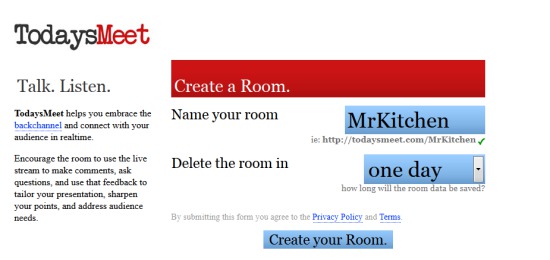 |
| Step 1 |
 |
| Step 2 |
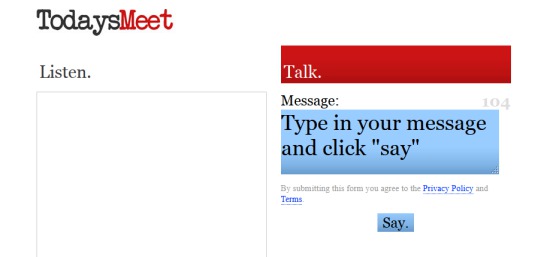 |
| Step 3 |
 |
| Step 4 |